

Description
Download ABC 3GP/MP4 Converter – video converter, 3GP, MP4, mobile video, format conversion, video tool, video utility, free video converter
Overview
ABC 3GP/MP4 Converter is a utility tool designed to simplify the process of converting video files into formats compatible with mobile devices. Its primary purpose is to enable users to transform various video files into 3GP or MP4 formats, ensuring seamless playback across smartphones and other portable media players. The app addresses a common challenge in digital content sharing: compatibility. Many video files created on computers or cameras are not natively supported by mobile devices, leading to playback issues. ABC 3GP/MP4 Converter eliminates this barrier by streamlining the conversion workflow.
Target users include individuals who frequently transfer videos from desktops to mobile devices, such as content creators, students, and casual users managing personal media libraries. The tool is especially beneficial for those without technical expertise, as it prioritizes usability over complexity. While the developer, ABC Software, is noted in the metadata, no further background information is available regarding the company’s history or other product offerings. The app was released in 2009, indicating a long-standing presence in the utility space, though its current relevance depends on modern system compatibility and support.
Real-world use cases include preparing video lectures for on-the-go viewing, converting home videos for sharing with family on mobile devices, or optimizing file size for easier transfer over slower networks. In the broader app ecosystem, ABC 3GP/MP4 Converter fills a niche role as a lightweight, no-frills conversion tool, offering a straightforward solution for a specific technical need without requiring subscriptions or advanced configurations.
Key Features & Functionality
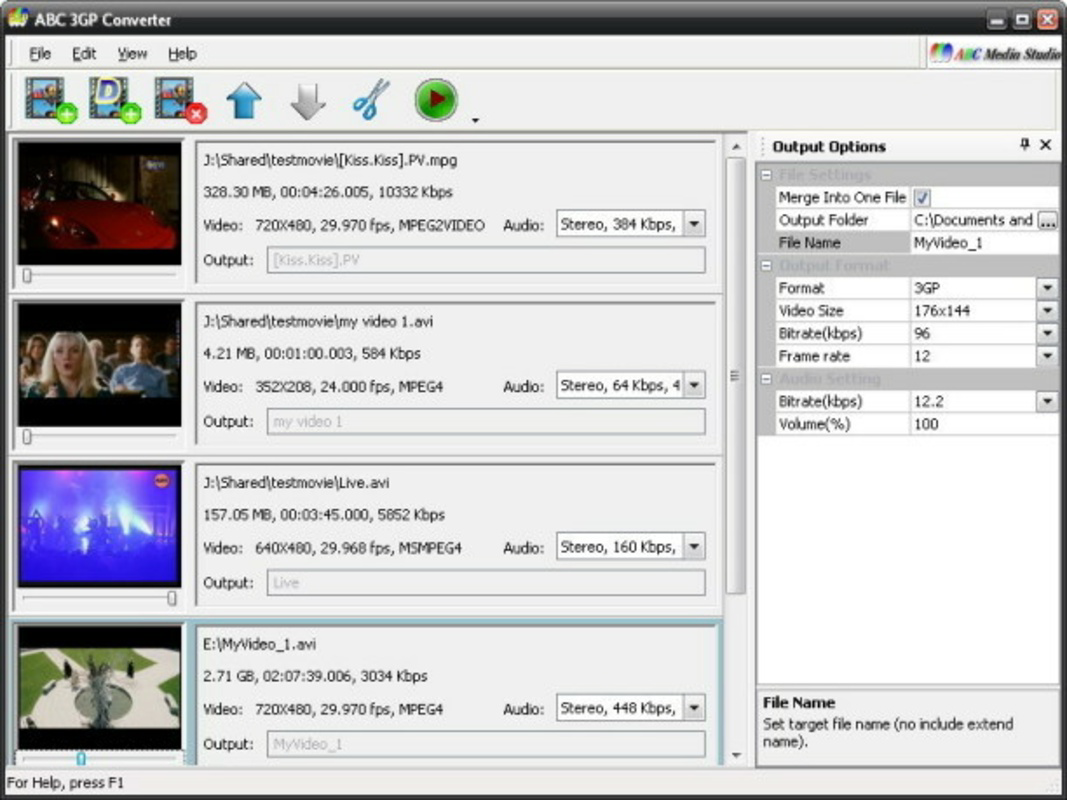
- Simple User Interface: The interface is designed with clarity and minimalism in mind. Buttons are clearly labeled, and the layout avoids clutter, allowing users to initiate conversions with just a few clicks. This design reduces cognitive load and supports quick task completion, ideal for users who prioritize speed over customization.
- Multiple Format Support: The tool supports a range of video formats for input, enabling users to convert files from various sources into 3GP or MP4 output formats. This ensures compatibility with older and newer mobile devices that rely on these standard codecs.
- Advanced Configuration Options: For users seeking greater control, the software includes settings to adjust video quality, resolution, frame rate, and file size. These options allow for fine-tuning based on device storage limits or network transfer requirements.
- Quick Conversion Process: The software is optimized for fast processing, reducing wait times significantly. This efficiency is particularly useful when handling multiple files or time-sensitive content.
- Minimal Learning Curve: With a streamlined workflow and limited number of options, the tool requires little to no prior experience. New users can begin converting videos immediately without needing to consult tutorials or documentation.
For example, a user preparing a series of educational videos for mobile viewing can import multiple files, select the MP4 format, and initiate batch conversion with minimal effort. The advanced settings can then be used to compress files for lower bandwidth usage, ensuring smooth playback on older devices.
Interface, UX & Performance
The interface of ABC 3GP/MP4 Converter is clean and functionally focused, emphasizing ease of use over visual flair. Navigation is linear and intuitive: users typically add files, choose output format, and start conversion with minimal steps. The layout avoids unnecessary panels or toolbars, reducing distractions and maintaining a clear focus on core functionality.
Although the developer did not list formal performance metrics, the app’s lightweight design—only 1.3 MB in size—suggests it operates efficiently even on older or low-resource systems. The software is likely responsive across different screen resolutions and window sizes, though specific device testing details were not provided. Stability is implied by its long-standing release history, but real-world performance on modern Windows systems may vary depending on OS updates and driver compatibility.
Responsiveness during conversion appears to be optimized, with minimal system lag reported in user feedback. However, no official benchmarks or load testing data were shared. The app does not appear to consume excessive memory or CPU during operation, which is critical for maintaining system performance while running other applications.
Platform Compatibility & Technical Requirements
ABC 3GP/MP4 Converter is designed for the Windows platform and is compatible with various versions of the Windows operating system. The software version is 2.1, and the file size is 1.3 MB, indicating a lightweight footprint suitable for older or resource-constrained machines. Specific minimum OS requirements were not listed by the developer.
Given its release date of March 23, 2009, the app may not be fully optimized for the latest Windows versions. Users on modern systems such as Windows 10 or Windows 11 may encounter compatibility issues, including missing dependencies or missing visual elements. The developer did not specify whether the software supports 64-bit systems or newer Windows APIs.
For users seeking a free, no-installation video conversion tool, this app remains a potential option, especially on legacy systems. However, those using current Windows environments should proceed with caution and consider compatibility testing before relying on it for critical tasks.
Pros and Cons
Pros
- Free to download and use, with no hidden costs or subscriptions.
- Lightweight file size (1.3 MB) ensures fast download and minimal storage impact.
- Simple, intuitive interface suitable for users with no technical background.
- Supports conversion to widely used mobile formats: 3GP and MP4.
- Offers advanced settings for users who want customization without complexity.
Cons
- Released in 2009; may lack support for modern Windows features and security updates.
- Compatibility with current Windows versions (e.g., Windows 11) is not confirmed.
- No official updates or maintenance information provided by the developer.
- Limited to Windows platform; no version available for macOS, Android, or iOS.
- Developer did not provide detailed technical specifications or system requirements.
FAQ
Is ABC 3GP/MP4 Converter safe to download and use?
The app is free and available from trusted sources. However, as it has not been updated since 2009, users should exercise caution when downloading from third-party websites and ensure they use a reputable source to avoid malware.
Can I use ABC 3GP/MP4 Converter on Windows 10 or Windows 11?
While the app was released in 2009, it may run on modern Windows systems. However, compatibility is not guaranteed, and users may encounter issues such as missing graphics or runtime errors. Testing on a virtual machine or older system is recommended.
Does ABC 3GP/MP4 Converter support batch conversion?
Yes, the software supports processing multiple files at once, allowing users to convert several videos in a single session without manual intervention for each file.
Is there a mobile version of ABC 3GP/MP4 Converter?
No mobile version is available. The app is exclusively for Windows and does not support Android, iOS, or other mobile operating systems.
How do I update ABC 3GP/MP4 Converter?
The developer has not released any updates since 2009. As such, there is no official update mechanism. Users should treat the current version as a static release and avoid downloading modified versions from unverified sources.
Final Thoughts
ABC 3GP/MP4 Converter remains a notable example of a lightweight, free utility designed for a specific technical need: converting video files to mobile-compatible formats. Its simple interface and minimal learning curve make it accessible to users of all skill levels, particularly those managing personal video content for smartphones. While its age raises concerns about compatibility and support, the app’s core functionality continues to serve users on older Windows systems.
For individuals who need a no-cost, straightforward solution for 3GP or MP4 conversion and are working on legacy hardware, ABC 3GP/MP4 Converter offers a practical option. However, users on modern systems should consider more recent alternatives with active development and broader compatibility.
Download ABC 3GP/MP4 Converter now
Guides & Tutorials for ABC 3GP/MP4 Converter
How to install ABC 3GP/MP4 Converter
- Click the Preview / Download button above.
- Once redirected, accept the terms and click Install.
- Wait for the ABC 3GP/MP4 Converter download to finish on your device.
How to use ABC 3GP/MP4 Converter
This software is primarily used for its core features described above. Open the app after installation to explore its capabilities.
User Reviews for ABC 3GP/MP4 Converter 0
No reviews found


